Relying on your own judgment to spot phishing scams is a failing strategy; you must build a digital fortress that makes your human error irrelevant.
- Sophisticated AI and mass-scale attacks are designed to bypass both spam filters and human intuition, making everyone a vulnerable target.
- True security comes from using unbreakable systems like hardware 2FA keys and vetted password managers that don’t depend on you spotting a fake.
Recommendation: Immediately upgrade your most critical accounts (email, banking) to hardware-based Two-Factor Authentication (2FA) and adopt a trusted password manager. This is your most effective defense.
You feel it every time you open your inbox: a low-grade hum of anxiety. Is that “password reset” email legitimate? Is that shipping notification real? You’ve been told for years to “be careful,” to “check for typos,” and to “not click suspicious links.” But this advice is dangerously outdated. The game has changed. Attackers are no longer lone hackers in basements; they are sophisticated, state-sponsored or corporate-level criminal enterprises using Artificial Intelligence to craft perfectly convincing emails, texts, and even fake video calls.
The threat is no longer about you making an obvious mistake. It’s about them creating a scenario so flawless that even an expert would be fooled. Phishing has become an industrial-scale assault on your identity and your savings. The volume and sophistication of these attacks mean that relying on your own vigilance—the “human firewall”—is like trying to stop a tidal wave with a bucket. It’s not a question of *if* you will be fooled, but *when*. Your defense can no longer be passive hope.
This is not a guide of tips to “be more careful.” This is an urgent briefing on how to build a digital fortress. We will shift the focus from trying to outsmart the attacker to implementing specific, unbreakable security protocols and tools. The goal is to create a system where, even if you are tricked into clicking a link and entering your password, the attacker still cannot get in. We will cover the new threat landscape, the hardware that makes you immune, the protocols for daily digital life, and the emergency plan for when things go wrong.
For those who prefer a visual format, this video offers an overview of key cybersecurity concepts. It serves as a good primer for the detailed strategies we are about to build together.
To navigate this critical subject, we have structured this guide to build your defenses layer by layer. From understanding the enemy to deploying your most powerful tools, each section is a crucial component of your new security posture.
Summary: A Practical Guide to Building Your Digital Fortress Against Phishing
- Why Scammers Are Winning Against Spam Filters?
- How to Set Up Hardware 2FA keys for Maximum Security?
- Password Manager or Notebook: Which Is Actually Safer?
- The Public Wi-Fi Mistake That Leaks Your Credit Card
- First 24 Hours: What to Do After Your Email Is Hacked?
- The Copy-Paste Error That Exposes Your Company Secrets
- Why 5-Star Reviews Are Often Fake on Major Platforms?
- Using LLMs to Automate Mundane Office Tasks Safely
Why Scammers Are Winning Against Spam Filters?
Let’s be brutally honest: your spam filter is fighting a losing battle. The reason is a combination of overwhelming scale and terrifying sophistication. Security researchers have documented a staggering 202% increase in overall phishing messages in the latter half of 2024 alone. This isn’t just more of the same old “Nigerian Prince” emails; it’s a flood of highly targeted, well-crafted attacks designed to slip through automated defenses. The sheer volume is intended to overwhelm systems and ensure that some malicious messages always get through to your inbox.
The second, more dangerous factor is the weaponization of Artificial Intelligence. Previously, you could often spot a phishing attempt by its poor grammar or awkward phrasing. Those days are over. A 2024 study revealed that AI-generated phishing emails now match the performance of those written by human experts, tricking people into clicking at alarming rates. AI allows criminals to create flawless, personalized emails in any language, referencing recent events or personal details scraped from your social media. They can mimic the tone of your boss, your bank, or a trusted online service with perfect accuracy.
This combination means the attacker has the advantage. They only need one email to slip past the filter and one moment of your distraction to succeed. You, on the other hand, have to be perfectly vigilant, 100% of the time. This is an impossible standard. The strategy of simply “watching out for scams” is obsolete because the scams now look identical to legitimate communications. Your defense must evolve beyond observation into active, systemic protection.
This is why we must shift from relying on filters and intuition to building a personal security system that works even when you’re fooled.
How to Set Up Hardware 2FA keys for Maximum Security?
If there is one single action you take to protect your digital life, this is it. A hardware security key (like a YubiKey or Google Titan Key) is the single most powerful weapon a non-technical person can deploy against phishing. Unlike codes sent to your phone or app-based authenticators, a hardware key makes it physically impossible for an attacker to log in to your account, even if they have your password. Why? Because the authentication happens between the key and the legitimate website. A fake phishing site can’t replicate this process. This is the core of a zero-trust authentication model: you don’t trust the login attempt; you verify it with a physical object.
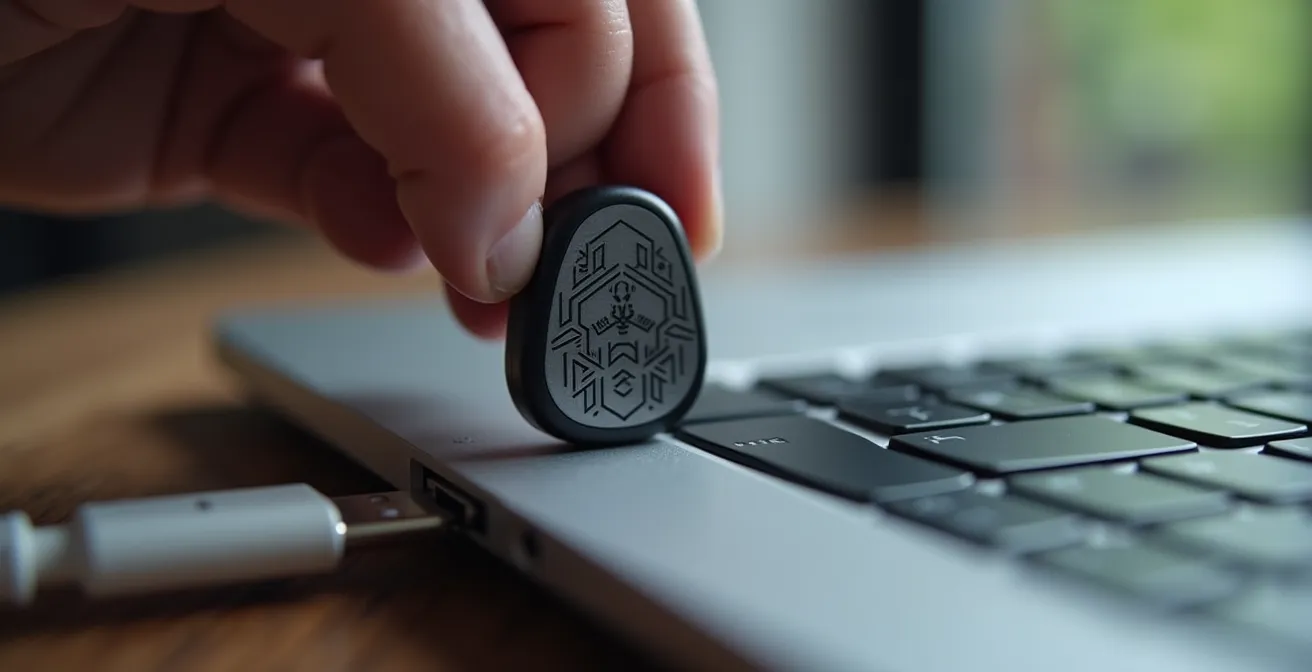
As you can see, the process is simple: when prompted, you insert the key and touch it. That’s it. This one physical action proves you are you, and you are on the correct website. It’s the digital equivalent of using a physical key to open your front door. Setting one up is straightforward. Your primary goal is to protect your main email account first, as it’s the key to resetting all your other passwords. Then, move on to financial institutions and any other critical accounts.
When choosing a key, you’ll see terms like U2F and FIDO2. While both are effective, FIDO2 is the modern standard that offers more advanced features. The key difference is that FIDO2 supports passwordless login, making your accounts both more secure and easier to access.
| Feature | FIDO2/WebAuthn | U2F |
|---|---|---|
| Passwordless Login | Yes | No (2FA only) |
| PIN Protection | Yes | No |
| Biometric Support | Yes | No |
| Multi-factor Authentication | Yes | Yes |
| Browser Support | All modern browsers | Limited |
The message is clear: a FIDO2 key is a small investment for an almost complete immunity to account takeover via phishing. It’s the cornerstone of your digital fortress.
Do not delay this. Order two keys today: one for daily use and one to be stored as a backup in a safe place.
Password Manager or Notebook: Which Is Actually Safer?
The human element is contained in 68% of breaches. Of those, 80-95% are initiated by a phishing attack.
– Verizon & Comcast Business, 2024 Verizon DBIR & Comcast Business Cybersecurity Threat Report
This statistic is the entire argument in a nutshell. The weakest link in any security system is the human. This brings us to a fierce debate: is it safer to use a digital password manager or a physical, offline notebook? For a non-technical person, the fear of having all their passwords “in one place online” is real. The idea of a simple notebook seems safer because it can’t be “hacked” from across the world. However, this view misinterprets the modern threat landscape.
The primary threat you face is not a sophisticated hacker targeting your specific password database; it’s a wide-net phishing attack tricking you into giving up a password voluntarily. Here, a good password manager provides a critical defense that a notebook cannot: auto-fill protection against phishing. A top-tier password manager (like 1Password or Bitwarden) links a password to a specific, legitimate website URL. If you land on a fake phishing site, even one that looks perfect, the password manager will not offer to auto-fill your credentials because the URL doesn’t match. This is an automated, unemotional security check that protects you when your human judgment fails.
A notebook, on the other hand, relies entirely on you to manually check the URL and then type the password. In a moment of distraction, you might easily enter your password from your notebook into a fraudulent site. Each method protects against different threats, but the password manager is designed to counter the most common and successful attack vector today: phishing.
| Threat Type | Password Manager | Physical Notebook |
|---|---|---|
| Remote Attacks | Protected (encrypted) | Immune (offline) |
| Physical Theft | Protected (master password) | Vulnerable |
| Phishing | Auto-fill protection | Manual entry risk |
| Fire/Natural Disaster | Cloud backup available | Total loss risk |
| Malware | Potential vulnerability | Immune |
While no solution is perfect, the verdict is clear for most people. The risk of a targeted hack on a major password manager’s infrastructure is far lower than the daily, constant risk of you falling for a phishing attack. The password manager acts as your automated security guard.
Choose a reputable password manager, create a long and unique master password (that you *do* memorize or store securely offline), and let it generate and store strong, unique passwords for every other site.
The Public Wi-Fi Mistake That Leaks Your Credit Card
Your work and life are mobile, and connecting to Wi-Fi at a café, airport, or hotel feels routine. This convenience creates a massive security blind spot. Public Wi-Fi networks are a hunting ground for attackers. A common mistake is treating these networks like your secure home network, exposing all your traffic to potential eavesdroppers. Information security professionals report a 62% increase in phishing attacks targeting remote workers, who are often using these insecure networks.
The most dangerous mistake is connecting without a Virtual Private Network (VPN). A VPN creates a secure, encrypted tunnel for your internet traffic. Without it, an attacker on the same network can potentially intercept everything you do—the sites you visit, the forms you fill out, and yes, the credit card details you enter. They can also perform “Man-in-the-Middle” attacks, where they redirect you to fake versions of legitimate sites (like your bank) to steal your login credentials.
Relying on a network having a password is not enough; that password is known by everyone in the venue. You must assume every public network is hostile. This requires a strict security protocol that you follow every single time you connect. It’s not about being paranoid; it’s about having a professional-grade security posture in an untrusted environment.
Your Non-Negotiable Public Wi-Fi Security Protocol
- Always use a reputable VPN before you do anything else on a public network.
- Verify the official network name with staff to avoid connecting to a malicious “evil twin” network.
- Turn off file sharing, AirDrop, and network discovery on your device before connecting.
- Enable your device’s built-in firewall for maximum protection.
- Use your phone’s mobile data for any sensitive transactions (banking, shopping) instead of the public Wi-Fi, even with a VPN.
Think of this checklist as your pre-flight procedure. It’s a non-negotiable set of steps to shrink your attack surface and ensure your data remains private, even when you’re out in the open.
The moment you treat public Wi-Fi with the caution it deserves is the moment you close a major door to attackers.
First 24 Hours: What to Do After Your Email Is Hacked?
The moment you realize your email has been compromised is terrifying. Panic sets in. But you must act with speed and precision. The first 24 hours are critical to contain the damage and reclaim your digital identity. You need an emergency lockdown protocol. Do not waste time wondering how it happened; focus exclusively on containment. Your goal is to kick the attacker out and assess the damage.

This is a crisis, and you need to respond like a professional. Follow these steps in this exact order:
- Disconnect and Isolate: If you’re on a computer you believe is compromised, disconnect it from the internet immediately. Use a different, trusted device (like your phone on cellular data) for the next steps.
- Reclaim the Account: Go to your email provider’s account recovery page. Use your recovery phone number or email to change the password to a new, long, and completely unique one. If you can, force a log-out of all other active sessions.
- Escalate Authentication: Immediately enable the strongest form of multi-factor authentication available, ideally a hardware security key as discussed earlier. This prevents the attacker from getting back in even if they try to reset the password again.
- Review and Revoke: Once back in, check for any changes the attacker made. Look at email forwarding rules (they often set up a rule to forward your mail to themselves), connected apps (revoke access for any you don’t recognize), and sent items (to see what they did).
- Initiate a “Ripple” Password Change: This is the most painful but necessary step. Your email is the key to everything. You must now assume any account that uses that email is compromised. Start changing passwords, prioritizing them: financial accounts first, then major online shopping sites, then social media, and so on.
This is your damage control plan. It’s systematic and designed to stop the bleeding fast. Only after you have contained the immediate threat should you start investigating the “how.”
Think of it as a fire drill. You practice it so that in a real emergency, you act, you don’t freeze.
The Copy-Paste Error That Exposes Your Company Secrets
The most sophisticated threats often exploit the simplest human habits. Consider the humble copy-paste function. You use it dozens of times a day without a second thought. But what if the data on your clipboard is a weapon waiting to be used against you? This isn’t theoretical. The landscape of data exfiltration is vast, with one report noting that 94% of organizations experienced data loss/exfiltration incidents last year. Many of these start with a simple human error.
Imagine you copy a sensitive piece of information—a customer’s account number, a draft of a confidential email, an internal server password. A few minutes later, you’re tricked by a pop-up or a social media quiz into pasting that information into a seemingly harmless text box. You’ve just exfiltrated company data. Now, combine this simple mistake with the power of modern AI.
Case Study: The $25.6 Million Deepfake Fraud
In a shocking 2024 incident in Hong Kong, a finance worker was duped into transferring $25.6 million to fraudsters. The attack was unprecedented in its sophistication. The employee was invited to a video conference call that appeared to include the company’s CFO and other senior executives. In reality, every single person on the call, apart from the victim, was a “deepfake”—a hyper-realistic AI-generated recreation. The deepfake CFO gave instructions, which the employee followed, resulting in 15 fraudulent transactions. This case, detailed in analyses of modern phishing attacks, shows how attackers can combine social engineering with AI to create completely convincing scenarios that bypass human suspicion.
The deepfake attack highlights the ultimate danger. Attackers don’t just need to steal a password anymore. They can steal contextual information and use it to build elaborate, trustworthy-looking hoaxes. The instruction pasted into an AI chatbot or the detail shared in an email can become the missing piece they need to authorize a multi-million dollar transfer.
This reinforces the core principle: your security cannot depend on your ability to spot the fake, because the fakes are becoming perfect.
Why 5-Star Reviews Are Often Fake on Major Platforms?
You’re conditioned to trust them. When looking for a product, a service, or even a job, a sea of 5-star reviews signals quality and trustworthiness. But in the modern digital economy, reviews have been weaponized. They are no longer just opinions; they are a key tool in the social engineering arsenal of scammers, used to create a false sense of legitimacy for their phishing operations.
Consider the explosion in employment-related scams. As layoffs become more common, vulnerable job seekers are prime targets. Scammers create fake job postings on legitimate platforms, often for well-known companies. To make these postings appear credible, they flood them with fake 5-star reviews from “employees” gushing about the wonderful work culture. The goal is to lure you into a fake application process designed to harvest your most sensitive personal information: Social Security number, bank details, and copies of your ID. This is not a small-time problem; FTC reports reveal that $501 million was lost to job scams in 2024, a dramatic increase from just $90 million in 2020.
A recent phishing campaign perfectly illustrates this tactic. Throughout 2023 and 2024, cybercriminals targeted job seekers by creating these fake, highly-rated job postings. The positive reviews acted as the bait, convincing victims to click through to malicious websites that mimicked real company career portals. Once there, their personal and financial details were stolen. The 5-star review wasn’t the scam itself; it was the trusted gateway to the real scam.
You must retrain your brain. Treat unanimous, glowing praise with suspicion. Look for patterns: are all the reviews short and generic? Were they all posted around the same time? Do the reviewer profiles look real? A healthy dose of skepticism is your first line of defense against being lured into a larger trap.
Trust is a vulnerability that attackers are experts at exploiting. Always verify through a separate, independent channel before providing any personal information.
Key Takeaways
- Human vigilance is a failed security strategy against modern, AI-powered phishing attacks.
- The most effective defense is a “digital fortress” built on unbreakable systems like hardware 2FA keys and vetted password managers.
- Security is not a list of tips; it’s a series of non-negotiable protocols for daily activities like using public Wi-Fi or handling sensitive data.
Using LLMs to Automate Mundane Office Tasks Safely
Large Language Models (LLMs) like ChatGPT are powerful tools for productivity, but for a security-conscious person, they represent a terrifying new frontier of risk. Every piece of information you paste into a public LLM is data you are handing over. Pasting a customer email to ask for a summary could violate privacy laws. Pasting internal code could leak trade secrets. However, avoiding these tools entirely means losing a significant competitive edge. The solution is not avoidance, but safe and strategic use.

The first principle of safe LLM use is to treat them as you would a junior intern: they are helpful but have no security clearance and cannot be trusted with sensitive information. Never, under any circumstances, paste passwords, API keys, financial data, or unredacted Personally Identifiable Information (PII) into a public-facing LLM.
To use these tools safely, you must adopt a framework that puts a barrier between your sensitive data and the AI. This involves several key practices:
- Data Anonymization: Before pasting any text, manually or automatically replace all sensitive names, emails, and numbers with generic placeholders like `[CUSTOMER_NAME]` or `[PROJECT_ID]`.
- Use Local LLMs: For truly sensitive tasks, use open-source models that run entirely on your local machine (using tools like Ollama or LM Studio). The data never leaves your computer, providing complete privacy.
- Defensive Prompting: Turn the tool into a security asset. Instead of asking it to draft an email, paste a suspicious email’s text (with personal details removed) and ask, “Analyze this text for common phishing indicators.”
- Establish Clear Boundaries: Create a personal or company policy that explicitly defines what can and cannot be entered into a public AI. Make it a hard rule, not a suggestion.
By implementing these protocols, you can harness the power of AI to automate tasks and even enhance your security posture without exposing your most critical information. It’s about using the tool on your terms, within the secure perimeter of your digital fortress.
Your goal is to build a system of defenses so robust that you can operate with confidence, knowing that a single mistake will not lead to a catastrophe. Begin implementing these strategies today to secure your digital life.